Service work order template (PDF and Word)
A printable blank repair order for car, phone, computer and any other repair service. Download it as a PDF, or as a Word file if you want to add your own details.
One A4 page, designed for black-and-white printing. No registration needed.
Multilingual template: switch the language at the top of the page, and the PDF and the Word file download in that language.
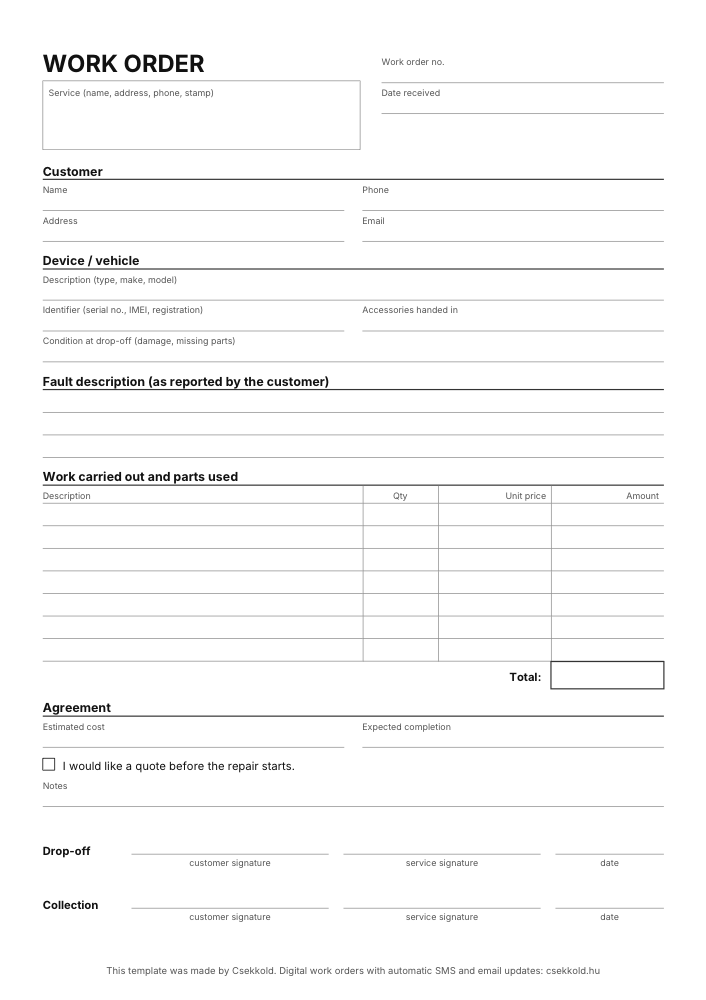
What is on the work order form?
Customer
Name, phone number, address and email, so you can reach them when the job is done.
Device or vehicle
Type, serial number, IMEI or registration, the accessories handed in and its condition at drop-off.
Fault description
In the customer’s own words, so you still know later why they brought it in.
Work carried out and parts used
Line by line with quantity, unit price and amount, with the total at the bottom.
Agreement
The estimated cost, the expected completion and whether the customer wants a quote first.
Signatures
Both the customer and the service sign at drop-off and at collection, with the date.
How to fill in the repair work order
A few things that spare you later disputes and needless phone calls.
Write down the identifier
With the serial number, IMEI or registration you are sure to hand back the right device, and a later warranty repair is easy to trace.
Record the condition it came in
Note existing scratches, damage and missing accessories at drop-off, so there is no question later of what was there before.
Agree on the cost up front
Write down the estimate and ask whether the customer wants a quote before you start.
Get two signatures
At drop-off and at collection: that way both sides confirm what was handed over and what was returned.
The same work order, digital.
Paper gets lost, and customers still call to ask whether it is ready yet. Csekkold is online work order software for repair shops: you record the same details in it, print the work order as a PDF with a QR code, and the customer is notified at every status change.
- Every work order searchable in one place
- Automatic SMS and email notifications
- Customers track the repair online
Frequently asked questions
Can I use the template for free?
Yes. You can download it, print it and use it in your own business as often as you like.
Is there a Word version?
Yes, you can also download it as an editable DOCX file. Open it in Word or LibreOffice, change the fields, add your logo and print it the way you need it.
Where do my business details go?
In the box at the top left: write in or stamp the name, address and phone number of your service. In the Word version you type them once, and they are on every sheet you print.
Do I need to buy pads of work orders?
No. This is a general work order form: print it as often as you need. If the customer gets a copy too, print it twice.
Is it suitable for car repairs?
Yes, but for garages we have also made a separate vehicle repair order template: with registration, VIN, mileage, fuel level and a diagram for marking damage.
What else is a work order called?
Job sheet, job card or repair order: they all mean the same form. In Hungarian it is munkalap, in German Reparaturauftrag.
How do I make the work order digital?
In Csekkold you record the work order on a computer or a phone. It becomes a printable PDF with a QR code, and the customer is notified automatically. You can try it with sample data, without registering.